23 July 2026 · 5 min read
How to Monitor for New Open Ports on Your Domain
To monitor new open ports, run a full port scan on a schedule, store each result and compare it with the previous scan. Alert only when a port appears, disappears or changes service. For one server, this can be automated with nmap, cron and diff. For multiple domains, the difficult part is maintaining history, controlling noise and understanding shared infrastructure.
The DIY approach: cron, nmap, and a diff
For a single server, this is a completely reasonable thing to build yourself:
- Run
nmap -p- your.server.ip(or a faster top-1000 scan) on a cron schedule. - Save the output, and diff it against the previous run.
- If the diff isn't empty, email yourself the result.
A short bash script wrapping nmap, diff, and mail gets you real, working port-change alerting in under an hour. If you manage one or two servers, this is genuinely a fine place to start - not every company needs SurfaceDiff, and you shouldn't reach for a paid tool before you've outgrown a cron job.
Where it breaks down
The cron-and-diff approach works until one of these happens - and they tend to show up once you're responsible for more than a couple of domains or hosts:
- No memory of why. A raw diff tells you port 8080 is now open. It doesn't know you already looked at this last month and decided it was fine - so you either re-investigate the same thing every time, or you stop reading the emails.
- No correlation across servers. If ten domains share one server, a single change on that server means ten separate diffs, ten separate emails, from ten separate cron jobs you have to keep in sync.
- Someone has to own the script. It has to keep running, the diff logic has to handle a server being briefly unreachable without treating that as "every port closed," and whoever wrote it eventually leaves or forgets how it works.
- No record for later. When someone asks "when did this port open, and who decided that was fine," a mailbox full of diff emails is not a great answer.
DIY vs continuous monitoring
| Capability | nmap + cron + diff | SurfaceDiff |
|---|---|---|
| Current open ports | Yes | Yes |
| Detect newly opened ports | Yes | Yes |
| Detect service fingerprint changes | Custom work | Yes |
| Multi-domain history | Custom work | Yes |
| Email incident alerts | Custom work | Yes |
| Shared-host deduplication | No | Yes |
| Review workflow | No | Yes |
| Audit trail | No | Yes |
What to do when a new port appears
Whether you find it with a cron script or with SurfaceDiff, the response is the same:
- Identify the host and service.
- Confirm whether the change was expected.
- Check whether the service should be publicly accessible.
- Restrict or close the port if it is unnecessary.
- Run another scan to confirm the remediation.
- Record the decision and evidence.
What continuous monitoring adds
This is the gap SurfaceDiff's scan → normalize → snapshot → diff → incident loop is built around. Each scheduled scan is compared with the previous snapshot. Observed differences become incidents with the previous state, the current state and detection time attached.
Reviewed and Resolved apply to a specific incident, each with a required reason. If an exposure is expected and should remain quiet, Mute is handled separately and remains in effect until that exposure changes again.
Example from our own monitored infrastructure: a scheduled scan fingerprinted an already-open port and found a different service responding than the previous scan had recorded for that same host and port. SurfaceDiff turned that into a service-fingerprint-change incident automatically, keeping the previous and current fingerprint side by side - no separate script had to notice or remember what used to be there.

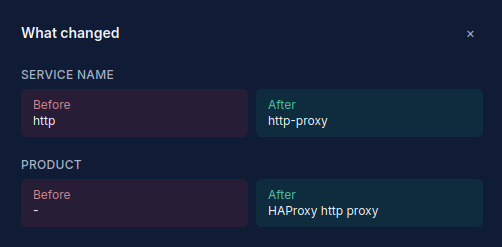
Service fingerprint change detected on infrastructure monitored by SurfaceDiff.
If you manage many servers for different clients - common for hosting providers - a change on a shared server is recognized as one event, not duplicated per domain sitting on it. More on that on our page for hosting providers.
Prefer continuous monitoring instead of maintaining the scripts yourself? See open port monitoring
Want to see what it actually finds on a domain you manage? Scan a verified domain - free, no card required, just a DNS record to prove you own the domain.